A small studio

Small tools,
carefully made.

Toolwright is a small studio building focused browser tools. Each one does a single job well, runs local-first, and stays out of your way.

Products

On the workbench

Available on the Chrome Web Store

Quorl — LinkedIn Post Composer

Write LinkedIn posts that earn the click. Quorl is a side-panel composer that shows you exactly where the "…see more" fold cuts your post off, formats text that actually renders in the feed, and hands you proven hooks to open with. You write, copy, and post — it never touches your account.
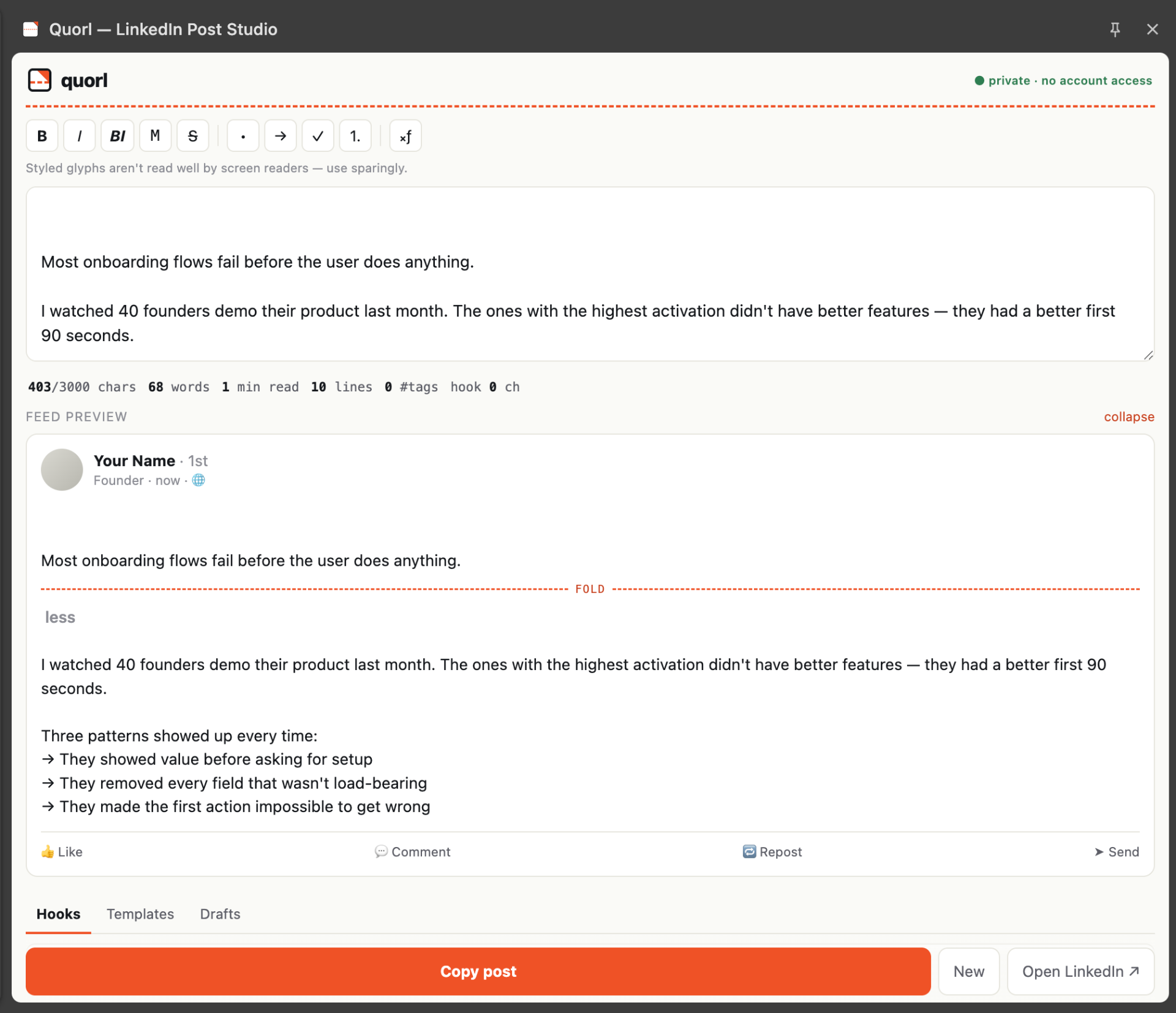
Quorl LinkedIn Post Studio interface showing the composer, feed preview with fold indicator, and hooks tab
  • See the "…see more" fold before you post
  • Formatting that survives the paste — bold, italic, and more
  • Proven hooks — never start on a blank page
Questions about Quorl

How can I see where LinkedIn's "see more" fold cuts my post before I publish?

Quorl is a free Chrome extension that shows a live preview of where LinkedIn's "…see more" fold falls, so you can write a hook that lands above the cut.

Is there a tool to add bold and italic formatting to LinkedIn posts?

Yes — Quorl adds bold, italic, and monospace formatting using the Unicode characters LinkedIn renders, so the styling survives when you paste.

What's a free LinkedIn post formatter Chrome extension?

Quorl is a free LinkedIn post composer and formatter that runs in Chrome's side panel — it previews the fold, formats text, offers hook templates, and tracks post length, with no LinkedIn account access.

Does Quorl need access to my LinkedIn account?

No. Quorl never connects to LinkedIn and does no automation. You write in Quorl, copy, and paste into LinkedIn yourself.

Available on the Chrome Web Store

Carrel — Notion Web Clipper

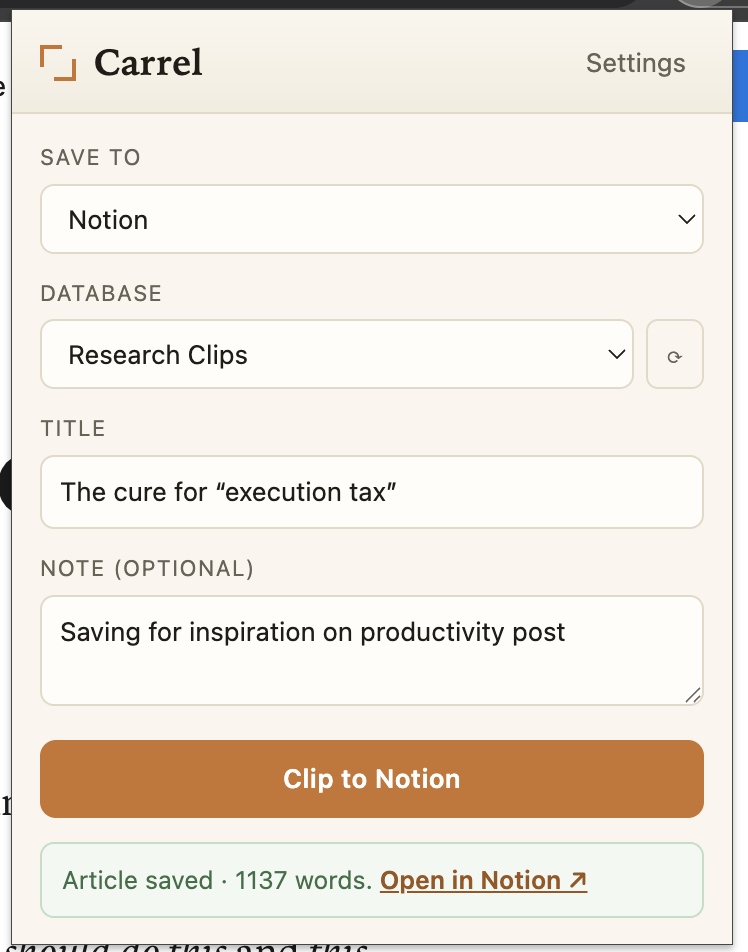
Save the web to Notion without losing a word. Carrel clips the full article — formatting, links, and all — straight into your Notion database, lets you set properties before you save, and quietly queues clips when you're offline. Local-first, no middleman.

Carrel browser popup showing Save to Notion, database selector, title, and Clip to Notion button
  • Full articles, never truncated
  • Set tags, status, and source before you save
  • Works offline — clips sync when you reconnect
Questions about Carrel

What's a Notion web clipper that doesn't truncate long articles?

Carrel is a free Chrome extension that saves the full text of long articles to Notion without truncation. Unlike the official Notion Web Clipper, which silently drops content on long pages, Carrel captures the entire article.

How do I save a full web page to Notion without it getting cut off?

Install Carrel, open the article, click the Carrel icon, and clip — the complete article is written to your Notion database. Carrel splits long articles across multiple Notion API calls so nothing is dropped.

Is there a free alternative to the official Notion Web Clipper?

Yes — Carrel is a free, local-first alternative that captures full articles, lets you set tags and properties before clipping, and works offline. Your Notion token stays in your browser and is never sent to a server.

Can I set tags or properties before saving to Notion?

Yes. Carrel lets you set Notion database properties and tags before you clip, so pages are organized as they're saved.

Can I clip to Notion when I'm offline?

Yes. Carrel queues offline clips and syncs them to Notion automatically when you reconnect.

Available on the App Store

Sundry — Home Replacement Reminders

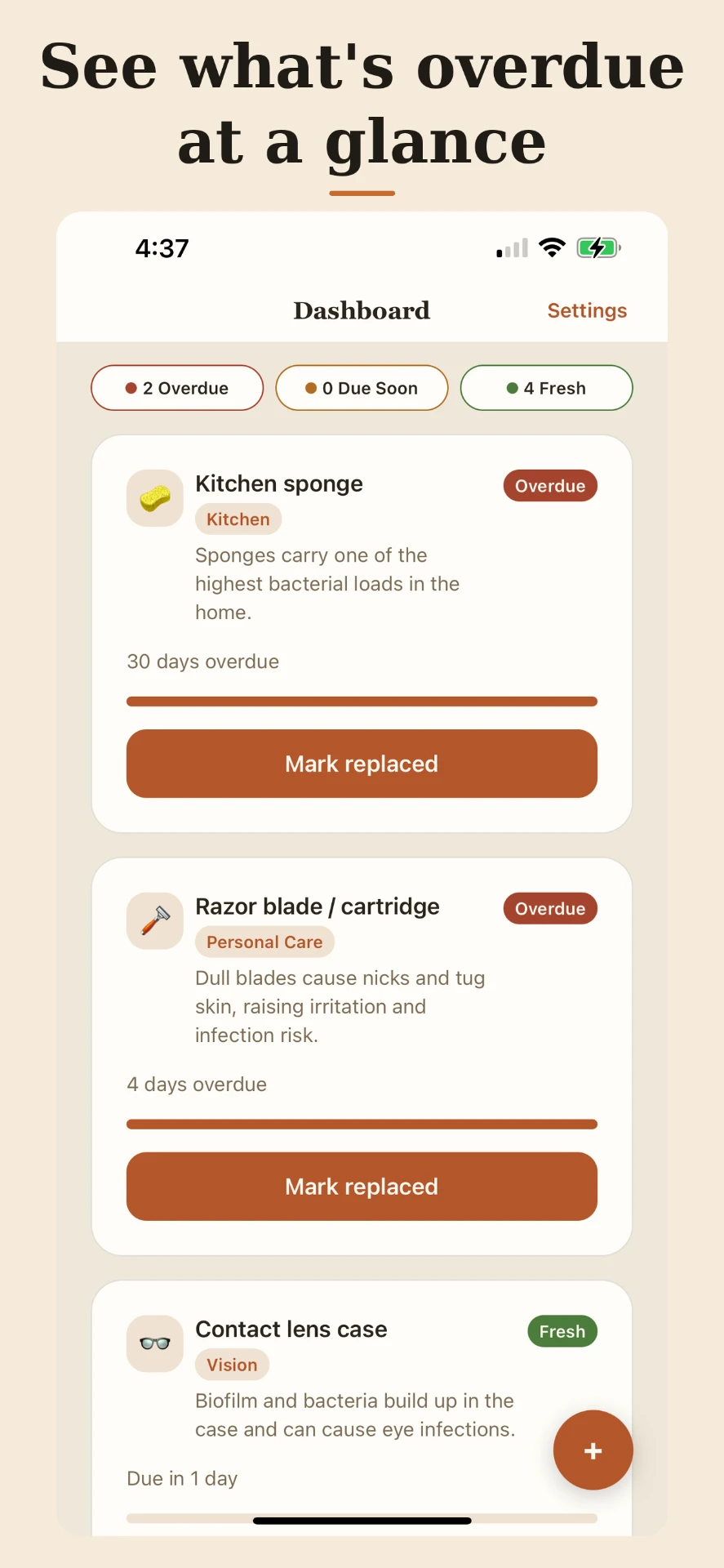
Know when to replace the everyday things that quietly affect your health — toothbrushes, water filters, sponges, contact cases, and more. Sundry comes preloaded with health-backed replacement timing, reminds you before each item is due, and keeps everything private on your device.

Sundry iPhone dashboard showing overdue, due soon, and fresh replacement reminders for kitchen sponge, razor blade, and contact lens case
  • Preloaded, health-backed replacement timing
  • Overdue and due-soon, at a glance
  • Local reminders — no ads, no tracking
Principles

How these tools are made

Local-first.

Your data stays on your machine and goes only where you send it.

One job, done well.

Each tool has a single, sharp purpose — no feature creep.

Quiet by default.

No noisy accounts, no tracking, no upsells.

Made by hand.

Built and maintained by one person who uses them every day.

The studio

What's a Toolwright?

A wright is someone who builds by hand — a wheelwright, a shipwright, a playwright. A toolwright builds tools.

Small, sharp, single-purpose software for people who'd rather finish the job than fight their software. No bloat. No accounts you don't need. Nothing watching over your shoulder. Just a tool that does one thing, and does it well.

Support

We're here to help

Questions about the tools? Email us at hello@toolwright.studio — we read everything.

Sundry privacy policy